AgeGuide

AgeGuide

AgeGuide

English  |  Spanish


AgeGuide-Logo-R

Your feedback is valuable.
Tell us what you think.

LET'S GET STARTED WITH YOUR CPR³!

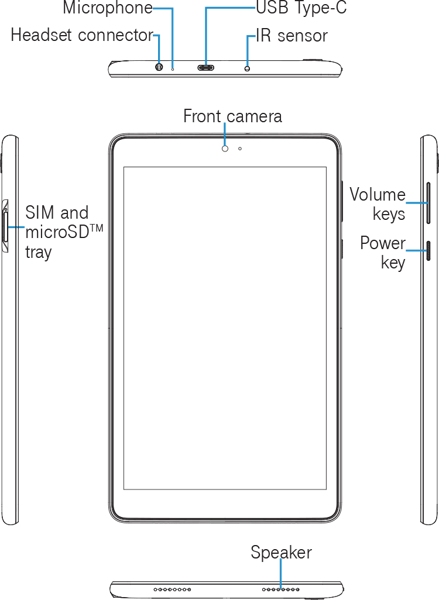
The image below details your tablet’s primary parts and key functions.

Getting-Started

Powering Up Your Device...

Charge your device:
Before turning on your device, charge it fully.

Turn your device on:
Press and hold the Power key until the device turns on.

Turn your device off:
There are two ways you can turn your device off.

1. Using the Power Key
1. Press and hold the Power key.
2. Tap Power off.

2. Via Quick Settings Panel
1. Swipe down on the Status bar twice to enter Quick Settings panel.
2. Tap Power icon Power-Icon> Power off.


Note: If the device has not been powered up for some time, it may require multiple updates upon powering up.

CPR3-Alcatel-Joy-Tab-KIDS-2

DEVICE TUTORIALS

Connect to the Hotspot

How To:

AgeGuide PARTNERS & PROGRAMS

Senior-Planet-Logo

Meet and Make
Friends Online

Learn More

AARP-Foundation-Logo

Reduce Isolation with Connect2Affect

Learn More

Northern-Illinois-Food-Bank-Logo

Get Groceries & Local Resources

Learn More

Partner-Agencies-Kankakee

Partner Agencies
Kankakee

Learn More

SUPPORT

Premier Wireless Support Hours:  
Monday – Friday

8:00 am (CT) – 6:00 pm (CT)

Email: support@pwbts.net
Phone: 281-667-0414

Premier Wireless Weekends/After Hours:
Email, voicemail with response during support hours


POWERED BY T-MOBILE 5G
TFB_Partner_Logo_Elite_PRI_RGB_on-W_2022-03-24 (1)

 
CPR³ SOLUTION CREATED BY 
Premier Logo Revised-1